





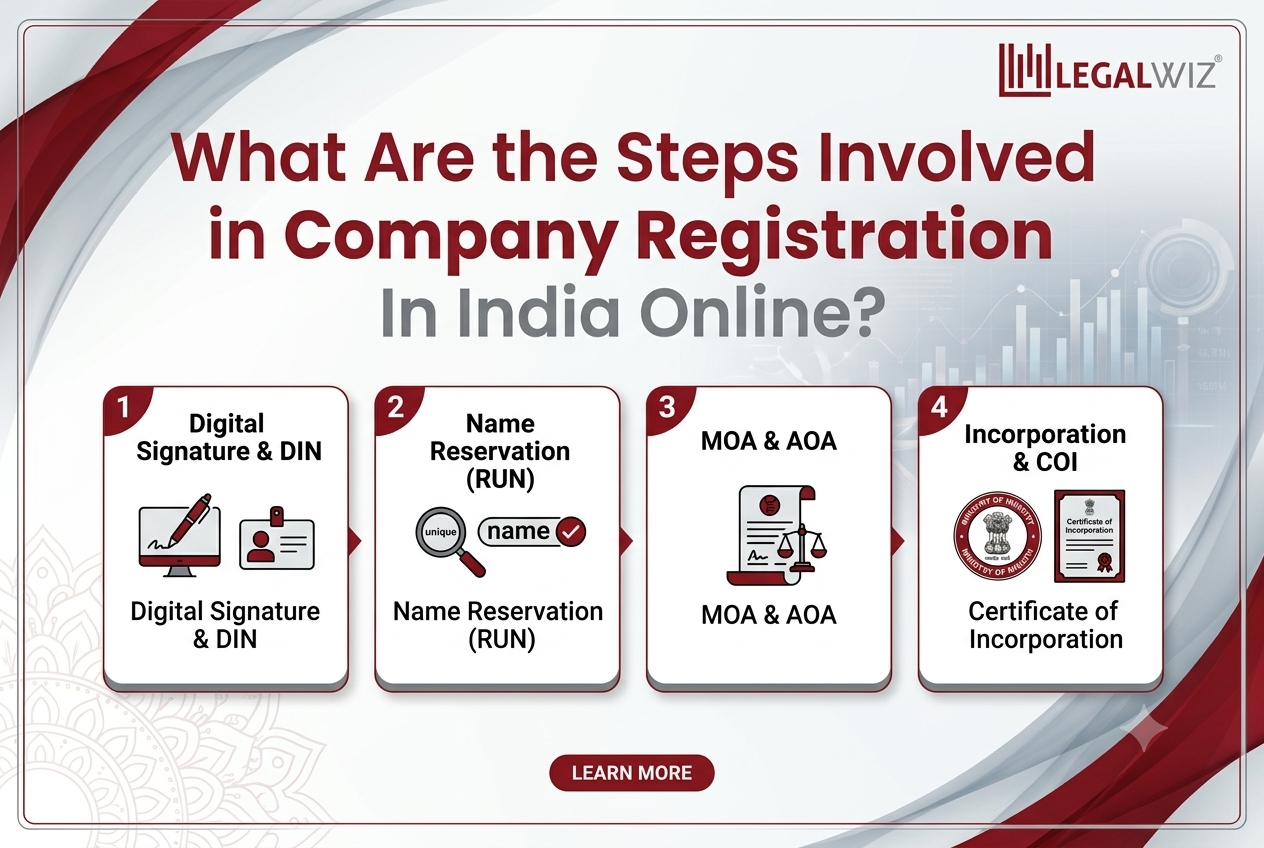
Starting a business in India has become significantly more accessible, transparent, and efficient over the last few years. The entire process of company registration is now fully digitized, centralized, and paperless, managed entirely through the Ministry of Corporate Affairs (MCA) portal. By eliminating physical paperwork, the government has empowered entrepreneurs to launch formal business entities from the comfort of their homes or offices.
Whether you are planning to incorporate a Private Limited (Pvt Ltd) company, a Limited Liability Partnership (LLP), or a One Person Company (OPC), understanding the digital workflow is essential. This article breaks down the foundational steps required for Company Registration In India Online.
1. Choose the Right Business Structure
Before touching any online portal, you must finalize your business entity type. The structure you choose dictates your liability, compliance burden, taxation, and fundraising capabilities. Common options include:
- Private Limited Company (Pvt Ltd): Ideal for startups, scale-ups, and businesses looking to raise venture capital or equity. It requires a minimum of two directors and two shareholders.
- Limited Liability Partnership (LLP): Combines the flexibility of a partnership with the benefit of limited liability.
- One Person Company (OPC): Allows a single promoter to run a corporate entity with limited liability.
2. Acquire Digital Signature Certificates (DSC)
Because the entire MCA filing system is electronic and paperless, physical signatures are not used. Every proposed director and subscriber (shareholder) to the Memorandum of Association (MoA) and Articles of Association (AoA) must obtain a Class-3 Digital Signature Certificate (DSC).
- Purpose: Used to authenticate and digitally sign the electronic incorporation documents.
- Requirements: You will need to provide self-attested copies of your PAN card, identity proof (Aadhaar, Passport, or Voter ID), address proof, and a passport-sized photograph to an authorized DSC issuing agency.
3. Director Identification Number (DIN) & MCA Account Setup
A Director Identification Number (DIN) is a unique 8-digit identifier required for any individual intending to act as a director of a company.
- Setup: You must register a free user account on the MCA portal.
- Application: Rather than filing a standalone form for DIN, the modern, integrated process allows you to apply for DIN directly for up to three directors within the main incorporation form.
4. Name Reservation (SPICe+ Part A)
Your business name is your brand identity, and it must be unique. It should not infringe upon existing registered trademarks, LLPs, or companies.
- You can apply for name approval directly via the SPICe+ (Form INC-32) Part A section on the MCA portal.
- It is highly recommended to brainstorm two distinct, meaningful names and check their availability against the MCA database and the IP India trademark registry beforehand.
- Once approved by the Registrar of Companies (RoC), the reserved name is held for 20 days, giving you time to complete the remaining documentation.
5. Prepare Incorporation Documents and Forms (SPICe+ Part B)
This is the core of company registration. The MCA uses an integrated web form known as SPICe+ (Simplified Proforma for Incorporating Company Electronically). Part B of this form handles multiple essential filings simultaneously:
- Company Incorporation Details: Capital, registered office address, number of shares, etc.
- e-MoA and e-AoA: The Memorandum of Association and Articles of Association must be drafted and filed electronically, outlining the objectives and internal bylaws of your company.
- Director Declarations (INC-9 & DIR-2): Standardized declarations confirming consent to act as a director and compliance with legal requirements.
- Linked Registrations: SPICe+ goes beyond just incorporating your entity. Through the linked AGILE-PRO-S form, you can simultaneously apply for your Permanent Account Number (PAN), Tax Deduction and Collection Account Number (TAN), EPFO/ESIC registration, professional tax (if applicable), and even open a bank account.
6. Document Upload, Digital Signing, and Fee Payment
Once SPICe+ and its linked forms are filled out accurately online:
- Convert the dynamic forms into PDF format where necessary, and affix the Class-3 Digital Signature Certificates (DSC) of the directors and authorized signatories.
- Upload the digitally signed forms back onto the MCA portal.
- Pay the requisite government incorporation fees, stamp duty, and PAN/TAN processing fees online. The total cost varies depending on your state of incorporation and the authorized capital of the company.
7. Verification and Issuance of the Certificate of Incorporation
Upon successful submission and payment, the Registrar of Companies (RoC) reviews the application and attached documents.
- If the RoC finds any discrepancies, errors, or naming conflicts, they will mark the application for re-submission (with a specific window of time to fix the issues).
- If everything aligns perfectly with the Companies Act, 2013, the RoC approves the incorporation.
- Outcome: You will receive an electronic Certificate of Incorporation (CoI) sent to your registered email. This certificate will proudly display your newly assigned Corporate Identification Number (CIN), along with the newly generated PAN and TAN for the business.
Post-Registration Steps
Once you successfully complete the company registration, there are several immediate compliances to keep in mind to function legally:
- Open a Bank Account: Use your digitally received CoI, PAN, and MOA/AOA to open a current bank account in the company’s name.
- Deposit Share Capital: Promoters must deposit their subscribed share capital into the company bank account and issue share certificates within 60 days.
- Appoint an Auditor: The company must appoint its first statutory chartered accountant auditor within 30 days of incorporation (via Form ADT-1).
- Hold First Board Meeting: Conduct the initial board meeting within 30 days of incorporation to set up operations and formally record business operations.
By leveraging the digitized MCA portal, the journey of company registration has transformed from a tedious months-long process into an efficient, predictable online procedure that typically resolves in about 7 to 14 working days, provided all documentation is accurate and compliant.